
Toastie
A health tracking app for people with chronic conditions, taken on as a live client project through Prodigi a university design society. I joined as project manager, then stepped into the design lead role when the project fell behind and needed stronger design ownership. Over 3 months I directed 4 other designers on a redesign of the Insights page, turning complex health data into something glanceable and actionable. I set the quality bar and ran the process, and as the deadline closed in I carried a large share of the design work myself.
ROLE
Design lead
TIMELINE
Sep 2024 - Nov 2024
SKILLS
User research
Project management
Quality assurance
Design leadership
TOOLS
Figma
Notion
Dovetail
OVERVIEW
The Insights page gave no insight
Problem
Users with chronic illnesses were logging symptoms and getting nothing useful back. The existing Insights page was overwhelming, hard to navigate, and surfaced no patterns or next steps.
Solution
We redesigned Insights around three goals:
Make data glanceable
Surface actionable alerts
Help users talk to their doctor
Outcome
Symptom logging went from 58 seconds to 25, after cutting 52 categories to 9. Timed on the same task before and after.

Team bonding and ideation day
APPROACH
A hybrid process, and where it broke
Initial approach
Two weeks of waterfall research to align the team on scope, then agile sprints for design. I allocated by experience, stronger designers on the complex screens and newer members on system components, and rotated assignments so nobody was stuck on the small work.
Late-stage approach
We were projected to fall behind. The team had strong research skills and mixed design ability, early hi-fi wasn't at the client's quality bar, and iteration cycles were longer than three months could absorb so I went more hands-on.
RESEARCH
Toastie's insights were free. But, the experience wasn't good enough.
Semi-structured interviews
Ten interviews with people managing chronic conditions. Mostly in their twenties, six living with PCOS, conditions running one to five years and some still undiagnosed. We had them log a symptom in the app while we timed it.
Market gap
We analysed 13 symptom-tracking apps and found the same gap in all of them. Insights sat behind a paywall at every price point for example:
Clue charges $9.99, and won't let you export data.
Flo charges $13.99 a month for insights.
Chronic Insights charges $59.99 for advanced insights.
Nerva is $200 a year with no cheaper tier.
Toastie gave insights away free, but every symptom had its own page, so nobody could see anything holistically. The opportunity was one centralised hub.
Overwhelming data
Tedious logging
No actionables
58
seconds logging time
52
unique symptoms to log
How might we turn health data into personalised, actionable insights for busy people?
THE WORK
Every screen went through three stages
I coached the team and gave them the UI work to own. As the deadline closed in I took final polish and QA across every screen, keeping the essence of their designs while fixing consistency and finish.
Insights hub
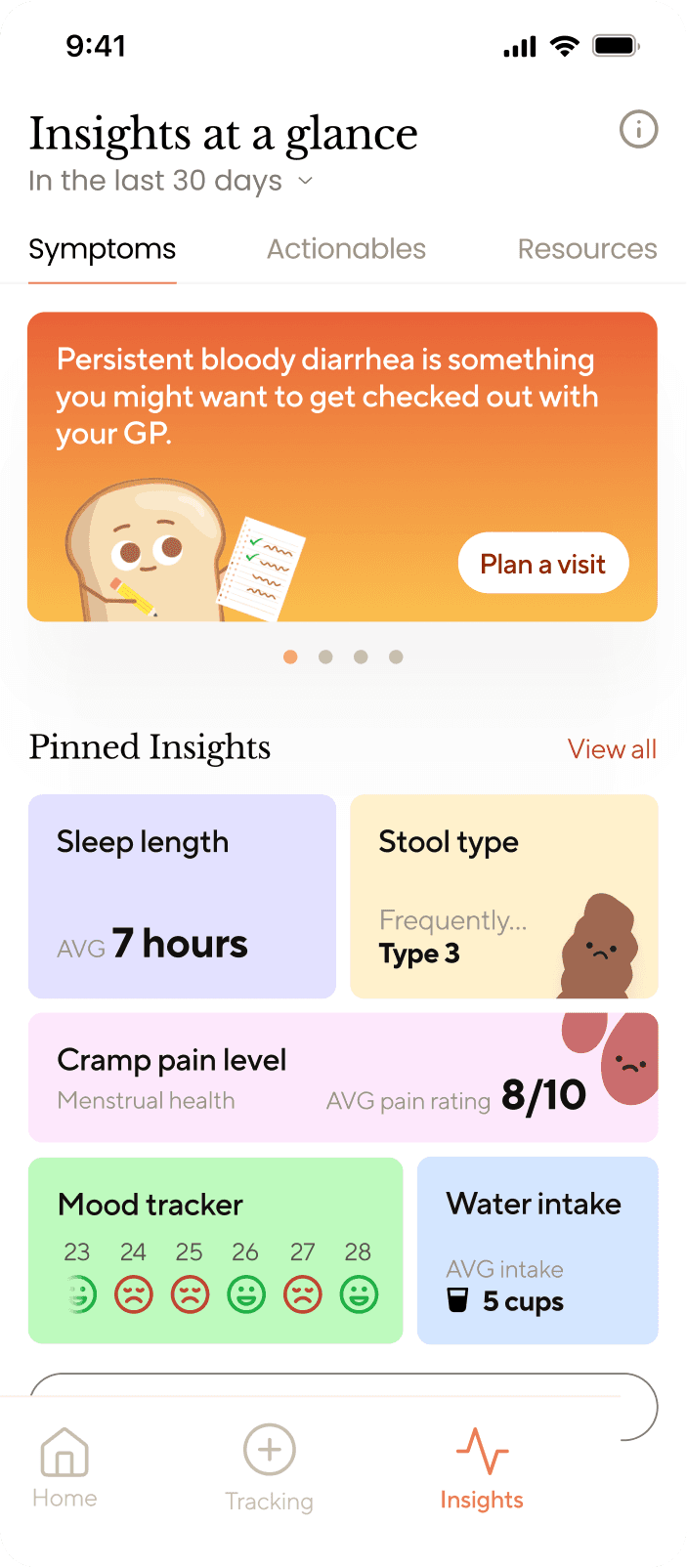
A hub that shows insights at a glance, daily actionables backed by data and community threads.

ORIGINAL

HI-FI

QA
Tab structure
I split symptoms, actionables and resources into their own tabs. It prevents information overload, and cycling through tabs is a natural mobile gesture.
Visual hierarchy
Busy, jaded users don't want to work to find what they need. I grouped content into their own sections and tabs, introduced on-brand fun themes to steer away from clinical.
Symptoms & data analysis
Detailed analytics and visualisations of tracked symptoms, without the scrolling.

ORIGINAL

HI-FI

QA
Space efficiency
I replaced excessive scrolling with a horizontal swipe and put a trend summary under the visual, so what mattered was visible immediately and corresponded to the graphs.
Date selector
Brought back into the open. Users switch time frames constantly to compare and export what they need.
Data export
This didn't exist before, users had no way to apply information to real life. Now, people can export tracked data as a PDF or CSV to hand over at an appointment for better personalised advice.

HI-FI

QA
Simplifying UI
The hi-fi version had too many options, adding cognitive load that our busy, jaded users didn't need. In the QA, I simplified it down to the essentials for a frictionless flow.
Export function
There was no export function originally, so we built one with a clear CTA and a linear process, closing a real gap for people who seek tailored advice in appointments.
The rest of the redesign

Actionables
Daily streaks and personalised tasks with alerts, so the app says what to do rather than only what happened. This helps people build healthier habits for their illness.

Symptom categories
52 categories cut to 9, with on-brand, clean visuals and a linear flow in a screen that used to feel chaotic. Now easier and suitable for daily logging.

Community resources
A new space to learn about your condition and connect with others going through the same experience.
Dealing with chronic illness often means figuring it out alone, through home remedies and self-diagnosis.
TESTING
We timed the same logging task on the redesign
How we tested
We timed the same logging task again on the redesign: find a symptom you actually get and log it. Alongside that we ran moderated think-aloud sessions across four tasks: reading your health data insights, finding and completing actionable tips, and exporting your health data as a PDF.
What testing showed
Main problem was that the Insights Hub screen had too much going on to take in at once. One participant said the gradients made her think harder, rather than less.
Reworked Insights Hub
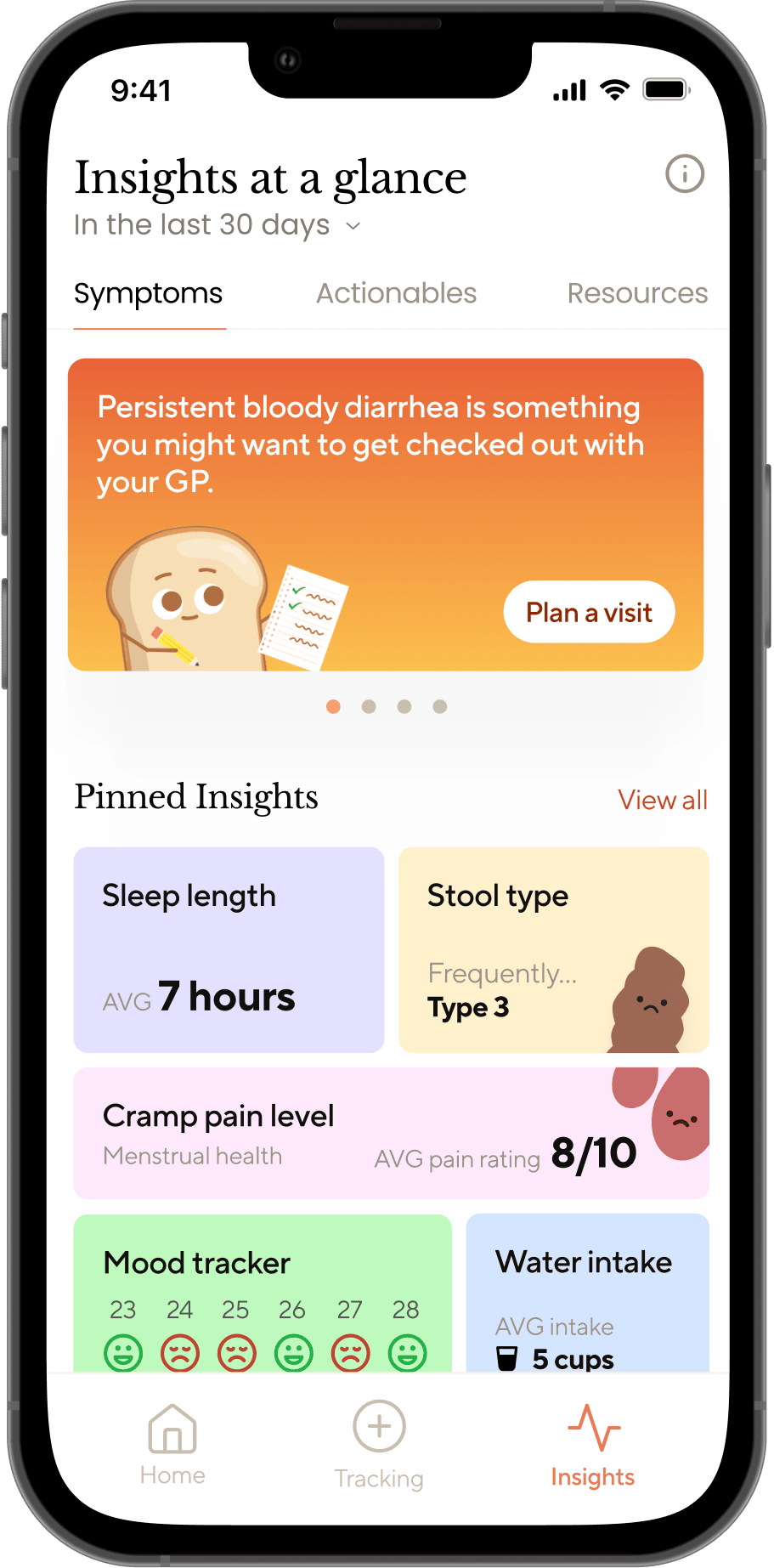
We never acted on the gradient issue from the test results at the time. So, I went back and reworked the screen to see what it would have looked like if we had. Without changing too much, it now has stronger visual hierarchy and gentler feeling.
QA

REWORK
Notification card
This is important since it shows urgent, actionable information. I gave it priority: softer gradient and circles for warmth, with colours chosen to stay legible and still grab attention.
Pinned insights
Toned down the colours. Less intrusive, keeps the visual flair, and keeps each stat scannable without competing with other elements. Someone managing an illness while already busy doesn't need more stress and clutter piled on.
RESULTS
What the testing shows
We delivered a centralised Insights page, a redesigned symptom analysis view, and a data export that didn't exist before. People with chronic conditions get very little time with their specialist, and handing over a clean summary changes that conversation.
52 → 9
Limits of the data
Both rounds were small. The logging test ran remotely with peers rather than recruited users. Enough to find the obvious problems, not enough to treat either number as precise.
“
"The redesign made everything cleaner and easier to navigate.
A huge improvement from where we started."
Client, Toastie
REFLECTION
What I learned
I took this on alongside my job at DAPPA, because I wanted to build my management and leading skills further in a field I knew nothing about.